



WCW Memory Monitor — A Real-time Memory Monitoring Plugin

Updated: Sep. 30, 2026
Published: Sep. 24, 2026
Update History
Sep. 30, 2026: Updated to v0.2.0 Beta
Why memory monitoring matters
Section titled “Why memory monitoring matters”In modern game development, especially Unreal Engine projects, rich visuals and large worlds sit next to a constant risk: running out of RAM or VRAM.
Poor memory control leads to blurry textures (streaming pool exhaustion), sudden frame drops, and out-of-memory crashes. These problems rarely appear in a quiet editor session. They show up when a player enters a specific area, or when several effects and assets load at once.
Watching usage against memory budget during real gameplay makes those spikes much easier to find.
WCW Memory Monitor
Section titled “WCW Memory Monitor”WinterCrownWORKS has released WCW Memory Monitor, an open-source C++ plugin for Unreal Engine.
Demo of WCW Memory Monitoring v0.2.0 Beta
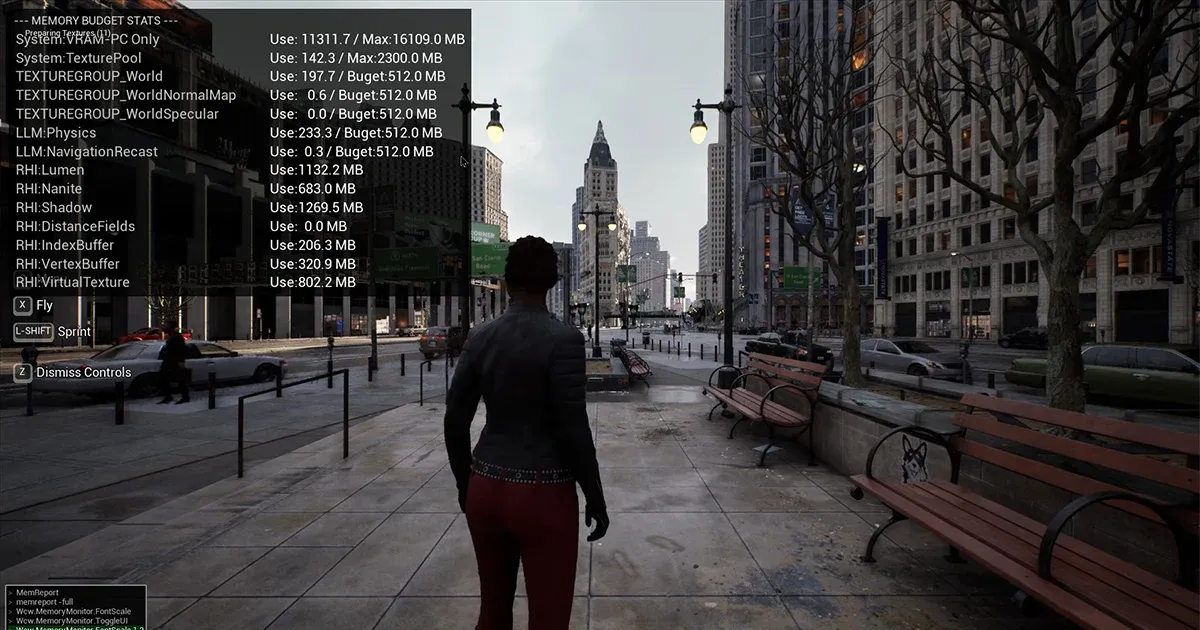
Section titled “Demo of WCW Memory Monitoring v0.2.0 Beta”It is a lightweight tool that lets you visualize changes in memory usage in real time during gameplay, without having to attach a heavyweight profiler.
Per-TextureGroup usage and LLM (Low-Level Memory) numbers sit on the same screen and update live. That side-by-side view is the main advantage of the tool.
Easier QA reports
Section titled “Easier QA reports”The plugin is designed to reduce the back-and-forth involved in bug investigation and lower communication overhead within the team.
- The gameplay video becomes a bug report.
Section titled “- The gameplay video becomes a bug report.”Record with the HUD on. You can match “where they walked” and “what they did” to the numbers on screen.
- Less “What was the status of the memory then?”
Section titled “- Less “What was the status of the memory then?””Screenshots and clips already include RAM / VRAM / LLM at that moment leading to smoother understanding of the situation
- Non-engineers can spot over-budget frames.
Section titled “- Non-engineers can spot over-budget frames.”When a memory category exceeds its project budget, the entry turns red, allowing testers and artists to flag the issue without having to interpret profiler data.
Download (Beta)
Section titled “Download (Beta)”The plugin’s source code, installation instructions, and detailed user manual are all available in the GitHub repository.
Sep. 30, 2026: Updated to v0.2.0 Beta
The HUD now stamps the build. If Config/Wcw.ini has TitleVersion and Changelist, those are shown; otherwise it falls back to Project Settings ProjectVersion. A capture keeps the version and CL, so a QA video can be matched to logs later.Quality Presets (AntiAliasing, ViewDistance, Shadow, GI, and others) are drawn on the same overlay, so the video shows which scalability level produced the numbers.
RHI rows are switched with Wcw.MemoryMonitor.EnableRHI 0|1. 1 scans tracked resources and is expensive; 0 prints Use: — MB (Disabled). Texture and LLM rows that cross the memory budget keep “Peak: MB @ time” for about five seconds.
Prebuilt Win64 binaries are for UE 5.6 / 5.7 / 5.8. Not loaded in Shipping.
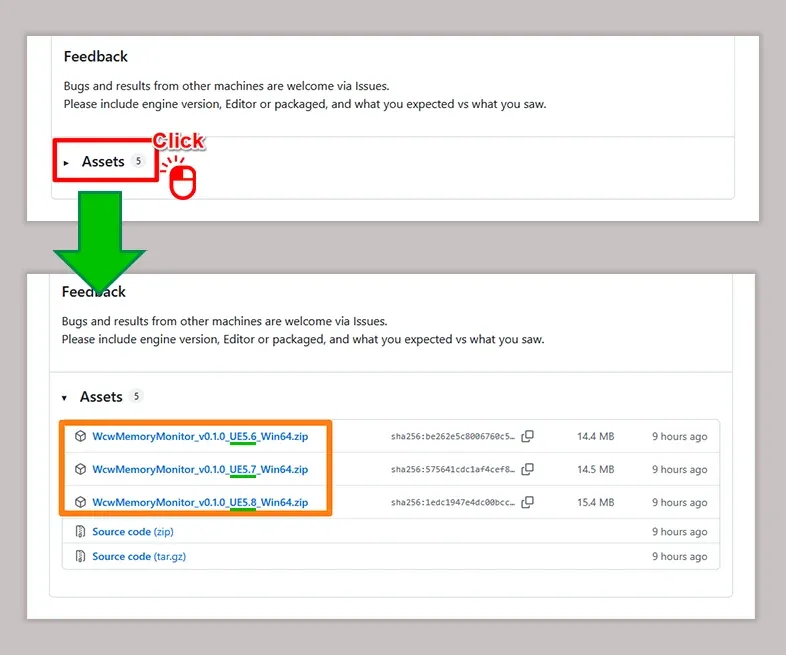
Click “Assets” under the latest release, then download the plugin that matches your version of Unreal Engine from the expanded list.
Repository
Section titled “Repository”Feedback Welcome
Section titled “Feedback Welcome”This plugin is currently available as a beta and has been tested with UE 5.6-5.8. To help us improve stability across a wider range of environments, please feel free to open a GitHub Issues if you encounter any unexpected problems or have suggestions for features you’d like to see. We look forward to your feedback!